
Cisco's SDWAN
A look into my experience as a UX Design intern at Cisco during the summer of 2023.

My Task
One of my assignments working as a UX Design intern at Cisco was to manage starting the conversion of design styles in the License Management Dashboard under Cisco's product, SDWAN, as well as developing and adding onto the Licensing/Provisioning section for minimizing the selection process for identifying and selecting different licenses under the Routing DNA page.
What is Cisco's SDWAN?
SDWAN is one of Cisco's products that is a software-defined wide area networking solution that works to address challenges within exposing an enterprise to the internet, such as balancing the user experience, security, and complexity.
Within SDWAN’s four key components responsible for each plane of organization in the cloud scale architecture, I worked within the user interface of the solution, which is called vManage, where configuration, provisioning, troubleshooting, and monitoring activity is done here. This side of the system connects applications to the cloud and provides multiple techniques to improve the application experience of end users.
Tools:
-
Figma
-
Miro
Timeline:
-
Overall: 10+ weeks
Design Process
Magnetizing License Management
Problem: The first biggest task was starting the conversion of design styles. Most of Cisco’s products were previously designed with the existing Cohesion design system, and were now slowly being converted to the Magnetic design system.
Solution: The goal for the design conversion was to maintain consistency across a lot of various Cisco products. Because a lot of apps were using different design libraries, moving over to the magnetic library allowed for a more unified experience that remained the same throughout all of Cisco’s products.
Cohesion Design System


Magnetic Design System


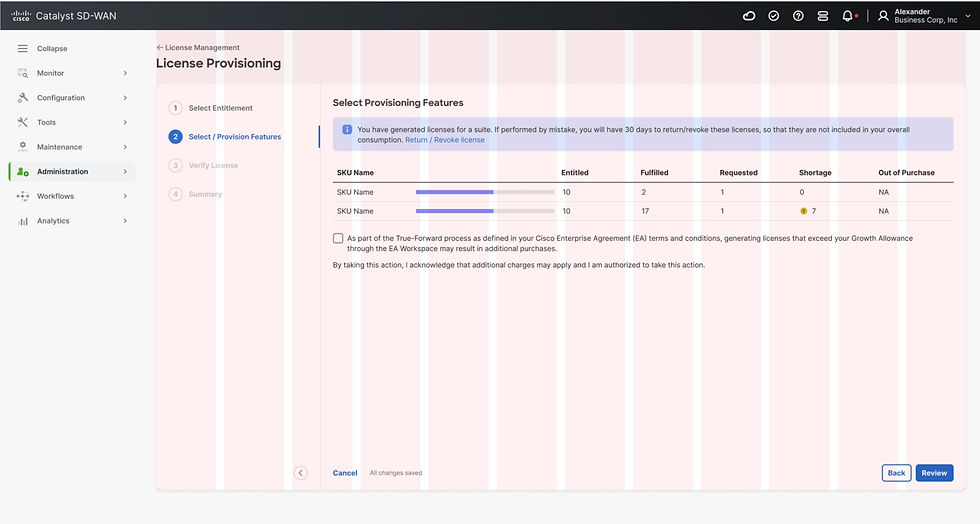
Another element to this project was to develop and add onto the Licensing/Provisioning page for the Routing DNA Advantage section. I helped in creating new workflows for minimizing the selection process for identifying and selecting different licenses under the Routing DNA page. The main problem that needed to be solved was to consolidate the number of steps the user had to take to select and choose the different licenses on the dashboard.
After doing multiple rounds of user research with the engineers on our back-end team, the first step was to create proper license consumption banners to depict when the compliance was not being met. Additionally, the web page initially lacked launching a direct flow directly from vManage, to pull up a license and its requirement options. After revisions however, I helped develop a step by step process in which the licenses are selected.

A final part of my internship included updating a newer page of vManage, where it managed creating configuration groups that were made to build and maintain a network efficiently with workflows. This process included configuring the chosen wide area networks with a smart configuration group, then creating a device design and wide-area network circuit.
I had to make revisions on the existing pages designed for the Network Function Virtualization (NFV) configuration pages. This was where the user needed to choose a router, either the SDWAN router and/or a firewall, and define the specific resources and wide area network interfaces with each configuration group assignment.
The main goal was to allow the user to dynamically push the configuration with directed data or content, instead of having to individually select each requirement in separate configurations. After user testing and multiple revision processes, the developed designs eliminated a lot of the multiple selections and made the workflow simpler to navigate, so that the configuration can be pushed dynamically with its directed content.
Device Configuration Design

